

WORK AT THE SPEED OF THOUGHT
Meet Beagle CRM’s keyboard shortcuts
Every click creates a small interruption. Moving to the mouse, finding the right menu and navigating between screens may only take a few seconds—but those seconds quickly add up.
Quick start
Press ? anywhere in Beagle CRM to open the completeshortcut guide.
Beagle CRM’s keyboard shortcuts help you move between records, create new work and search your entire organisation without taking your hands off the keyboard. The result is a faster, calmer way to work, especially when you spend much of your day updating customer. information
Press ⌘ K on a Mac or Ctrl K on Windows and Linux to open global search.
Start typing to search across customers, contacts, leads, quotations, sales orders, invoices, projects, service desk cases and products—as well as Beagle CRM’s main navigation destinations.
Use the arrow keys to move through the results, press Enter to open the highlighted item and press Esc to close the search.
Global search is particularly useful when a customer calls unexpectedly. Rather than remembering whether the information you need is stored under a contact, project, invoice or case, search once and jump directly to the right record. Results are limited to your current organisation, keeping information relevant and appropriately separated.
GO ANYWHERE
Jump to any area of Beagle CRM
Press G, followed by another letter, to navigate directly to a section. The keys are pressed one after the other, rather than at the same time.
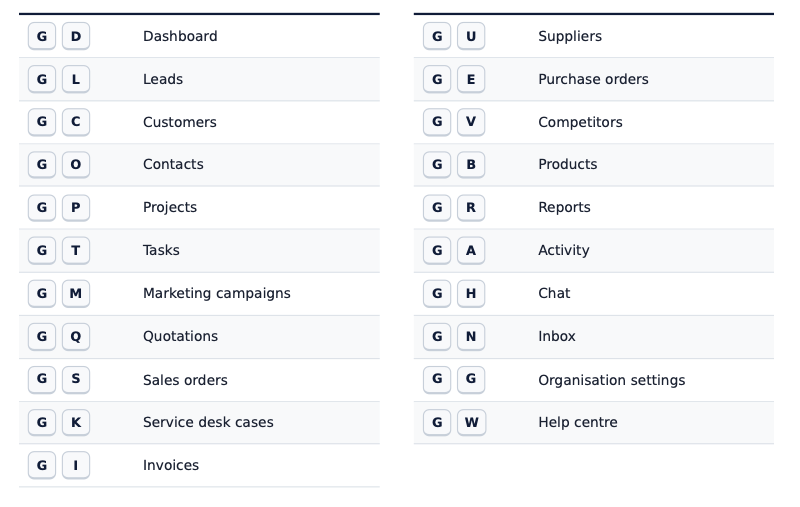
Instead of opening the navigation and scanning for the right destination, you can move there in two keystrokes. Once the combinations you use most become familiar, navigating Beagle CRM starts to feel almost instant.
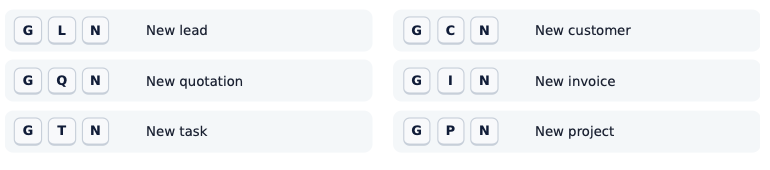
Create new records without breaking your flow. On supported list pages, press N to create a new record. You can also combine navigation and creation into one quick sequence:
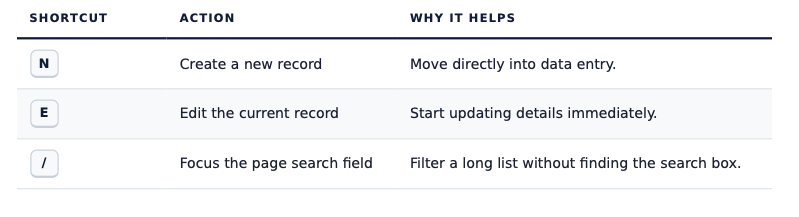
Act on the page you’re already viewing
A few single-key shortcuts handle the actions you use most. They appear wherever the corresponding action is available.
Move through lists from the keyboard
Beagle CRM also provides shortcuts for reviewing rows in a list. The focused row is clearly highlighted and automatically brought into view as you move.
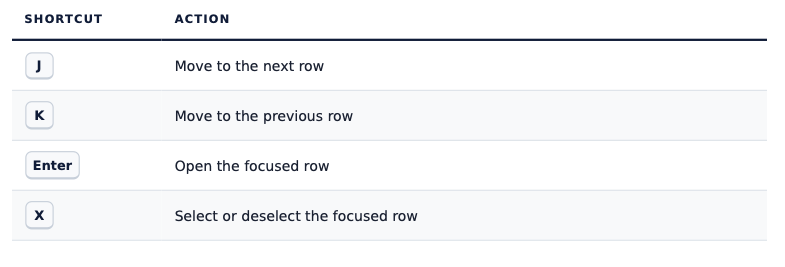
This makes it easier to review leads, tasks and other records one after another. For repetitive work, it reduces both physical movement and mental friction: your attention stays on the records rather than on positioning the mouse.
Shortcuts that stay out of your way
Keyboard shortcuts should make an application easier to use, not introduce surprises. Beagle CRM disables single-key shortcuts while you are typing in a form, search field, dropdown or note editor. Typing the letter N in a customer note will not accidentally open a new record.
Standard browser shortcuts using Ctrl , ⌘ or Alt are left alone, with the deliberate exception of ⌘ K or Ctrl K for Beagle CRM’s global search. If you begin a shortcut and change your mind, press Esc to cancel it.
You don’t need to memorise everything
Press Shift + ? anywhere in Beagle CRM to open the complete keyboard shortcut guide. Press Esc when you are ready to close it.
Start with the shortcuts that match your everyday work: After a few days, these actions begin to feel natural—and the time saved starts to add up. Keyboard shortcuts are not only about working faster. They reduce interruptions, make repetitive tasks less tiring and help you stay focused on the customer or job in front of you.